Tesselform for Windows.
One installer for everyone. Without a licence key it runs as the free Viewer; enter a key to unlock the modules it carries. During the open beta, every module is free until 19 October 2026, with no card needed.
Tesselform for Windows
Version 0.9.10, released 13 October 2026, 131 MB. Windows 10 or 11, 64-bit, with DirectX 12 graphics.
The download needs a free account with a confirmed email address; the account is where your licence keys live too. Release notes and earlier versions.
Windows says “Windows protected your PC”? Why it appears, and what to do
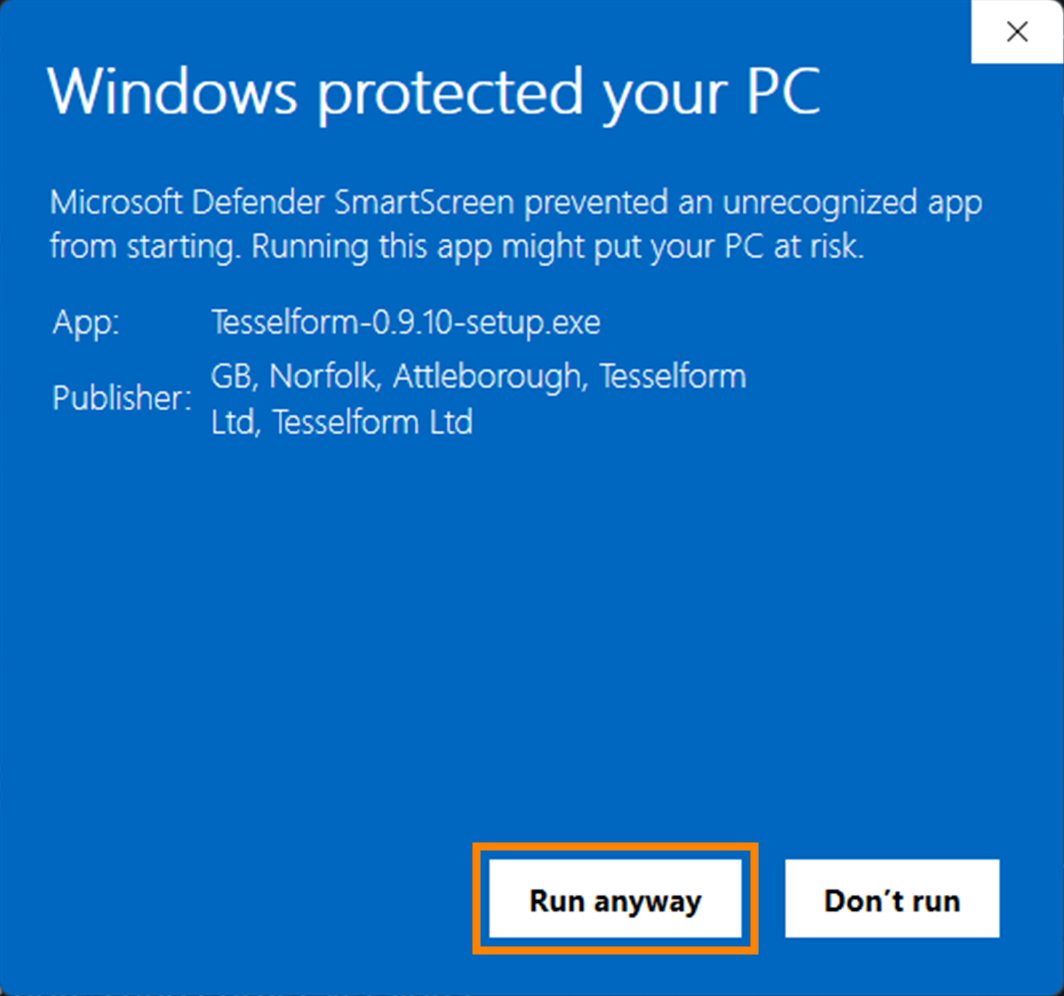
Windows shows this for new software it has not yet seen installed by many people. Tesselform is new, so Microsoft’s SmartScreen warns about it until enough people have installed it. The installer is digitally signed by Tesselform Ltd, so you can check it really came from us.
- Click More info under the message.
- Check that Publisher says Tesselform Ltd. If it says anything else, or “Unknown publisher”, do not run it, and tell us.
- Click Run anyway. The installer then opens as normal.
The warning stops by itself as more people install Tesselform.
Getting started
Three steps from here to your first scan.
Download and install
Create a free account, confirm your email address, and run the installer. It installs for you alone, so it needs no administrator password, and everything Tesselform needs, including its Python, is inside.
Get a licence key
Join the open beta, or buy the modules you need. Your key is on your account page.
Activate
Paste your licence key when Tesselform asks for it. Each key is active on one computer at a time.
Before you install
What your computer needs.
- Operating system
- Windows 10 or Windows 11, 64-bit
- Graphics
- DirectX 12 capable graphics (feature level 11_0 or later)
- Memory
- 16 GB minimum; 32 GB or more for large scans
- Internet
- To activate your licence, then now and then to renew it: at least every 14 days for a subscription. Passes and perpetual licences run offline. Tesselform also checks for updates when it can, and you choose when to install them. Your scans and models are never uploaded.
Not sure your computer is up to it? The trial is the easiest way to find out, and we are happy to advise.
Open source
Source code for the open-source libraries.
Tesselform includes these libraries under the GNU Lesser General Public License. Here is the complete source code of the exact versions in the installer, at no charge. Every open-source component, with its licence, is on the open-source notices page.
- Qt 6.8.3: qtbase (Qt Core, GUI, Widgets, Network and Concurrent, with their plugins)
- qtbase-everywhere-src-6.8.3.tar.xz, 46 MB, GNU LGPL v3
- Qt 6.8.3: qtsvg (Qt SVG, with its plugins)
- qtsvg-everywhere-src-6.8.3.tar.xz, 1.9 MB, GNU LGPL v3
- GEOS 3.13.1 (inside Shapely, in the bundled Python)
- geos-3.13.1.tar.bz2, 6.5 MB, GNU LGPL v2.1